Run your entire cold-email operation from an AI agent
Norbelys ships a remote MCP server: one URL that hands Claude, Cursor, or your own agent the whole platform as tools — import leads, verify, segment, launch, and monitor without opening a browser tab.
By David Lara, Founder
Founder-reviewed ·How we research and correct articles
Cold email is operations work: import this list, verify those addresses, cut a segment, wire the sequence, watch the bounce rate. Every one of those steps has a button in a dashboard — and none of them actually needs you to press it. They need judgment at exactly two moments: what the campaign should say, and whether it’s safe to launch. Everything between is coordination.
That’s what an AI agent is for, and it’s why Norbelys ships a first-party remote MCP server. Point any MCP-capable client — Claude Code, Claude’s custom connectors, Cursor, or an agent you wrote yourself — at one URL and it gets the entire platform as callable tools:
https://mcp.norbelys.com/mcp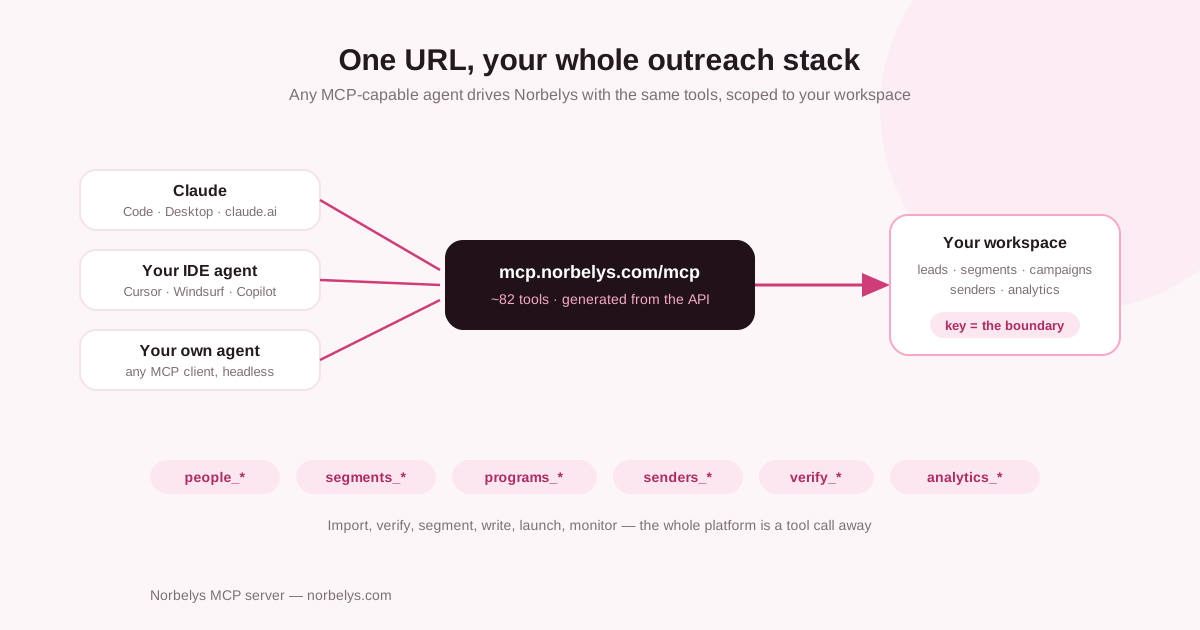
A wrapper, not a second product
The server exposes ~82 tools, and every one of them is generated from the same
contract that defines our public REST API. people_bulkCreate is
POST /v1/people/bulk; programs_launch is POST /v1/programs/{id}/launch.
Same validation, same errors, same plan limits. There is no “MCP version” of
the platform that lags the real one — when the API gains an endpoint, the agent
gains a tool.
That design has a security consequence worth spelling out: the MCP server holds no credentials and makes no decisions. Your agent authenticates with an organization-scoped API key (or an OAuth sign-in on interactive clients), and that credential is forwarded to the API on every single call. The key is the tenant boundary. There’s no org parameter on any tool, which means the classic confused-deputy mistake — an agent accidentally operating on the wrong workspace — is not merely unlikely; it’s unexpressable.
Connect in one minute
Create a key in the dashboard under Settings → API keys, then:
# Claude Code
claude mcp add norbelys --transport http https://mcp.norbelys.com/mcp \
  --header "Authorization: Bearer ak_live_…"
// Cursor — ~/.cursor/mcp.json
{
"mcpServers": {
"norbelys": {
"url": "https://mcp.norbelys.com/mcp",
"headers": { "Authorization": "Bearer ak_live_…" }
}
}
}Clients with a connect flow (Claude’s custom connectors, for instance) can skip the key entirely: add the URL, sign in, pick your workspace during consent.
First thing to ask your agent: “call organization_find and
organization_pulse and tell me how my workspace is doing.” The first
confirms which tenant the credential acts on; the second returns every
campaign with its funnel, the mailbox fleet, and your deliverability headline
in one read. If those two work, everything works.
The Tuesday-afternoon test
Here’s the run that convinced us this is the right shape — the full lifecycle, CSV to launched campaign, as one conversation. The agent’s tool calls, in order:
1. Import. Hand the agent your CSV and it calls people_bulkCreate — up
to 10,000 leads per call, with duplicate handling on the email key so
re-importing an updated list enriches instead of duplicating. If your list is
still a pile of half-baked exports, build it properly
first.
2. Verify. For anything risky, verify_email returns a deliverability
verdict — sendable or not, free vs. business domain, disposable detection, a
0–100 score with the reason spelled out. The agent quarantines the junk
without being told twice. (Why this gate matters: bounce rate is the one
number that compounds.)
3. Segment. segments_create with a filter — industry, role, verification
status, engagement history. Segments are live queries, not frozen lists: leads
that match tomorrow are in tomorrow.
4. Write the sequence. programs_create sets the shell — schedule window,
timezone, daily ramp, stop-on-reply. Then the steps, where your judgment
actually belongs. The templates take merge fields, fallbacks, and spintax:
{{ givenName | default: "there" }} — saw {{ company }} is hiring SDRs.
{Most teams|Almost every team} that scales outbound hits the same wall…
Review the copy yourself. The agent coordinates; the first line is still your job.
5. Attach senders and enroll. programs_senders_add for the mailboxes,
programs_enroll to point the segment at the campaign. Sending rotates across
the attached mailboxes inside their warmup-aware daily budgets.
6. Launch — with a human gate. programs_launch is annotated
destructiveHint: true, and that’s not decoration. It’s the Model Context
Protocol’s standard way of saying confirm with the user before calling, and
well-behaved clients do exactly that. The same flag sits on messages_create
(a test send is still a real email in a real inbox) and programs_resume.
Reads can run unattended all day; the moments that touch strangers’ inboxes
come back to you.
7. Monitor. From then on, it’s questions instead of dashboards.
“Bounce rate on yesterday’s sends?” → analytics_query. “Anyone reply
positive overnight?” → the activity feed. “How close am I to my plan’s email
cap?” → organization_usage.
Total human involvement: the copy, and one yes at launch.
What we deliberately did not build
It would have been easy to make the MCP server “smart” — its own retry logic, its own idea of safe sending, its own cache of your data. We did the opposite, and the boring version is the feature:
- No business logic in the wrapper. Guardrails live in the platform, where they protect every client equally. Daily budgets, warmup ramps, bounce auto-pause, suppression enforcement — your agent cannot talk its way past them, because the tools go through the same doors your browser does.
- No stored credentials. The server forwards your bearer and remembers nothing. Revoke the key, and every agent holding it goes dark at once.
- Lean payloads. List results are compacted for model context — full email
bodies elided from list rows (that’s what
messages_findis for). Your agent reads outcomes, not megabytes.
Standing orders
Once the connection exists, the interesting workflows are the recurring ones — the agent as an operator with standing instructions rather than a chat you babysit:
- The morning brief. “Every morning:
organization_pulse, flag any campaign whose reply rate dropped below 2% or bounce rate rose above it, and list mailboxes out ofhealthy.” - The list janitor. “Weekly: find leads stuck without engagement after the full sequence, tag them into a re-engagement segment, and draft — draft, don’t send — a different angle.”
- The deliverability tripwire. “If spam complaints exceed 0.1% on any campaign, pause it and tell me why you think it happened.”
Every one of these is a read loop plus a gated write — precisely the shape the annotations were designed for.
The full connection guide, tool naming reference, and error semantics live in the MCP docs. If your outreach still lives in browser tabs, start here — the agent takes it from there.