One inbox for every reply you get, no matter which mailbox sent the email
When you send from five mailboxes, replies land in five inboxes — unless you have one place they all funnel into. Here's what that looks like in Norbelys.
By David Lara, Founder
Founder-reviewed ·How we research and correct articles
Send from one mailbox and replies are easy to track — they all land in one place, because there’s only one place for them to land. Send from three, five, or a dozen mailboxes, which is normal once a campaign is running real volume, and you’ve quietly created three, five, or a dozen places a reply could be waiting for you right now. Most people find out about the good ones late, because nobody’s habit is to check every connected mailbox every hour.
That’s the actual problem the unibox solves. Not “email is hard to read” — reading email is easy. The problem is replies scattered across mailboxes you don’t watch equally, arriving on no schedule, with a clock running on the good ones the moment a prospect hits send.
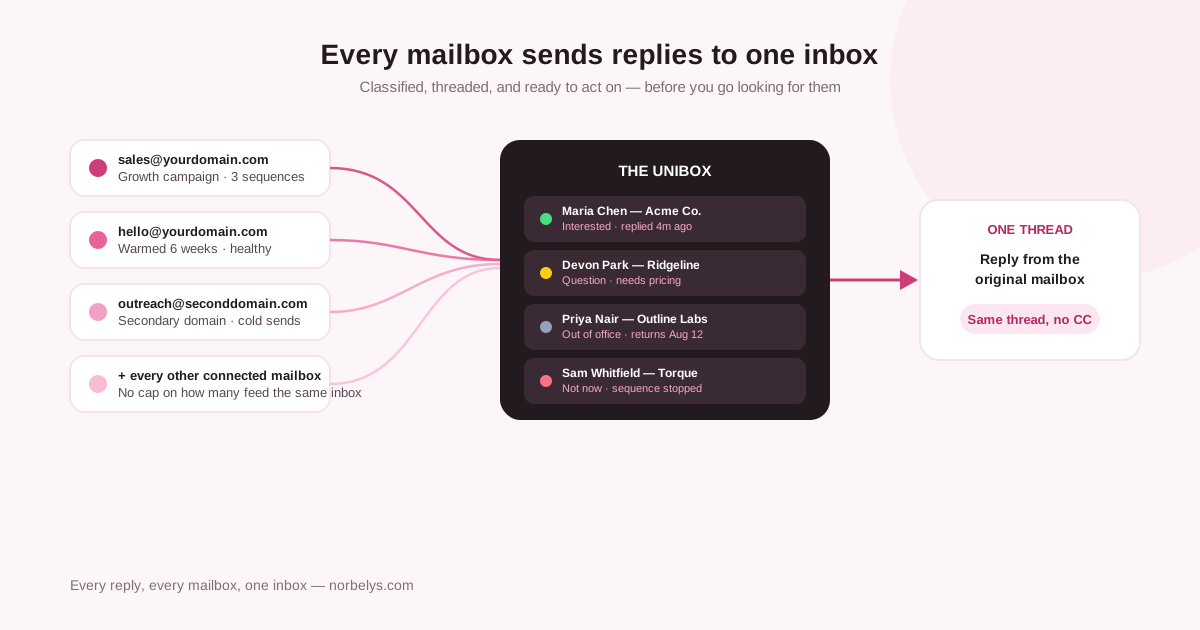
Every connected mailbox feeds the same inbox — classified on arrival, replied to from the original thread.
What actually lands in one place
Every reply from every connected mailbox — across every active campaign — shows up in the same message log. That includes the mailbox it arrived on, the person and campaign it’s tied to, and the full thread it belongs to, so you’re never reconstructing context from a bare subject line. You don’t switch between five webmail tabs to know whether Tuesday was a good day; you open one view and it already has all five days in it, from all the mailboxes that sent.
This matters more as sending scales, not less. A single-mailbox setup can get away with manually checking one inbox because the volume is small enough to eyeball. The moment you’re running a program across several sending domains — which most serious cold-email operations end up doing, for deliverability reasons alone — manual checking turns into a part-time job nobody signed up for, and the job’s real cost is the reply you found four days late.
Replies are classified the moment they arrive, not after you read them
A reply isn’t just “not a bounce” — it’s a decision waiting to be made, and different replies need different decisions. Norbelys classifies each one on arrival instead of leaving that judgment call to whoever happens to open the inbox first:
- Interested — a genuine positive response, surfaced first because it’s the one with a closing window.
- Question — a reply that needs an answer before the conversation can move, not a yes or a no on its own.
- Out of office — an automated bounce-back, not a real response; the underlying sequence isn’t treated as answered.
- Not now — a soft decline that stops the sequence without pretending it was interest.
That classification isn’t cosmetic labeling for a tidy dashboard. It changes what happens next automatically: by default, any human reply stops the relevant sequence immediately and cancels whatever step was already queued, so nobody gets a follow-up email the day after they told you no. An out-of-office reply doesn’t stop anything permanently — it just nudges the next send past the stated return date, back into a normal sending window, instead of quietly counting as a reply that inflates your numbers and stalls a sequence that should keep running.
Acting on a reply without leaving the thread
Speed matters more for replies than almost anything else in outbound — someone who just wrote back is thinking about your email right now, not next Tuesday. The reply composer works directly from the original thread: it uses the same connected mailbox and the same message reference the prospect replied to, so your response lands as the next message in an existing conversation instead of arriving as an unrelated new email that makes the recipient re-establish who you are.
From a reply landing to a reply going out
It lands and gets classified
The reply appears in the unified log tagged Interested, Question, Out of office, or Not now, with its person, campaign and mailbox attached.
The sequence reacts automatically
A human reply stops the relevant sequence and cancels any already-queued step, by default — no manual pause required.
You open the thread, not a fresh inbox
Full conversation history is right there, so you're replying with context instead of guessing what the last message said.
You send from the same mailbox, same thread
The response goes out from the exact sender the prospect wrote to, referencing the original message — one continuous conversation, not a new one.
If you’d rather draft than write from scratch, an AI-assisted reply can pull from the full thread, mirror its language, and stay grounded in what was actually said instead of inventing links or claims you didn’t send. You can edit it, ask for another version, or write the reply yourself — the point is the option exists in the same place you’re already reading the message, not in a separate tool you have to context-switch into.
Finding a specific reply without scrolling
A single view across every mailbox is only useful if it’s also searchable as one thing, not five separate places you’d have to check the same filter against. The unified log filters by classification, campaign, mailbox, and person, so “show me every Interested reply from the Growth campaign this week” is one filter, not a manual scan across however many mailboxes fed that campaign. That matters most on the days replies come in fastest — after a new sequence launches, or after a subject line change goes out to a fresh batch — which is exactly when a scattered inbox setup would cost you the most time finding the messages actually worth answering first.
Where it hands off from there
A reply doesn’t have to stay a solo task, either. Reply events can notify your team’s existing workflow and sync context — the person, the conversation, the campaign source, the mailbox, the classification — into connected CRM tools, so an “Interested” tag in the unibox can trigger a Slack alert or a new record in your pipeline without someone manually copying details across three tabs. The unibox is where you read and answer; the handoff is what happens automatically once you have.
What this replaces
The realistic alternative is checking N inboxes at N different intervals and hoping the interesting reply wasn’t the one you missed. Or building your own duct-tape version — a shared inbox, a spreadsheet someone updates, a Slack channel where people paste screenshots of replies. All of that works until volume grows past what a person can watch by hand, which for most teams running more than one or two mailboxes is closer to week two than year two.
This is included from the first plan, not an upgrade you grow into — every connected mailbox, every reply, one place, from the day you launch your first campaign. If you’re already running outbound across more than one sending address and finding replies late, that’s the specific problem worth fixing before the next one. See the plans and connect your mailboxes — the unibox is waiting on the other side of your first send, not a separate thing to set up afterward.