A Chrome extension bug lets other extensions make Claude read your Gmail
A flaw in Claude for Chrome, unresolved weeks after it was reported, lets any other extension fake a click and make it read Gmail, Calendar, and Salesforce.
By Gabriel Lara, Developer Relations, Norbelys
Founder-reviewed ·How we research and correct articles
The pitch for an AI browser extension is that it acts like a second pair of hands on your open tabs: read this thread, pull that calendar slot, draft a reply. The catch, according to security researcher Ax Sharma of Manifold Security, is that Anthropic’s Claude for Chrome extension has spent months unable to reliably tell the difference between a click you made and a click another extension faked on your behalf — and as of the version shipped July 7, that gap was still open, according to reporting from The Hacker News.
That’s not a hypothetical. It’s the difference between “an AI assistant read my inbox because I asked it to” and “an AI assistant read my inbox because a completely unrelated browser extension told it to, and it had no way to say no.”
What actually breaks
Chrome extensions communicate with the page and with each other through the
DOM, and browsers give developers a way to tell a real user interaction
(a mouse click, a key press) apart from one a script generated:
Event.isTrusted. According to The Hacker News’ account of the research, the
onboarding click handler in Claude for Chrome fires on any matching click
event regardless of that flag — meaning a script running in a different,
unrelated extension can simulate the click and Claude’s extension treats it as
if you’d clicked it yourself.
Chained together, a malicious or compromised browser extension — something you installed for an unrelated reason, or one that got compromised after the fact — doesn’t need to touch your Google account, your OAuth tokens, or anything about your session. It just needs to be running in the same browser and know which buttons to press on Claude’s own interface. From there it can ask Claude to do anything the extension is authorized to do: read Gmail messages, pull Google Docs content, check your Calendar, and — per Malwarebytes’ reporting on the same research — reach connected services including Salesforce.
The severity ceiling here is set by one toggle. In Claude for Chrome’s normal mode, actions still surface a confirmation prompt, so a forged click mostly buys an attacker an unwanted approval dialog. Once a user has turned on “Act without asking” mode for convenience, that confirmation step is gone — and so is the last thing standing between a forged click and a silent read of your inbox.
The part that should worry you more than the bug itself
Manifold first reported this to Anthropic on May 21, against version 1.0.72. Malwarebytes confirmed it was still reproducible in the version released July 7 — eight point releases later. That’s the real story: not a zero-day nobody could have caught, but a known, reported, reproducible flaw in a product that reads your email, sitting open for weeks while the extension kept shipping updates that didn’t close it.
If you or anyone on your team has installed an AI browser extension and granted it standing access to a work inbox, that’s the operating assumption you’re working under right now — not “is this specific bug patched,” but “how much do I trust every other extension in this browser to never be compromised, forever,” because that’s the actual trust boundary a general-purpose browser agent creates.
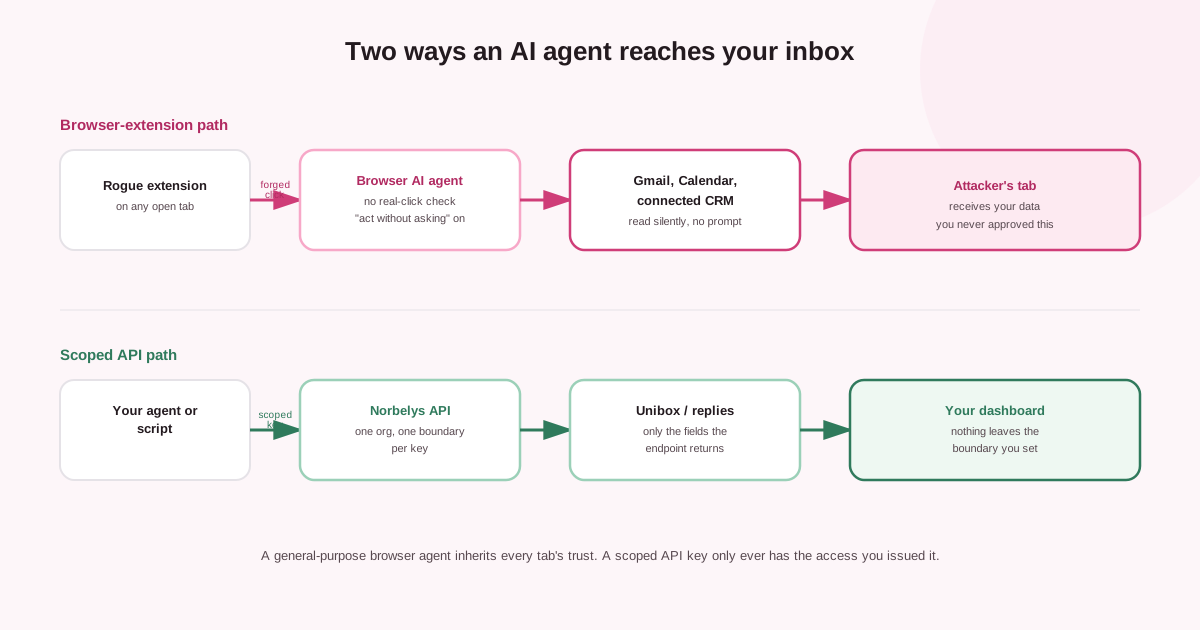
A browser agent inherits the trust of every extension sharing the tab. A scoped API key only ever has the access it was issued.
Why this matters specifically for a sending mailbox
Cold email and reply handling both live in the same place this bug targets: your inbox. If the mailbox you’re sending from — or the one collecting replies — is also the mailbox an AI browser extension has standing, confirmation-free access to, you’ve built a second, much weaker door into your sending domain. A prospect’s reply thread, a suppression request, a draft your team hasn’t sent yet — none of it needs to be exfiltrated by a sophisticated attacker if a browser extension can just ask your AI assistant to hand it over.
This isn’t an argument against AI reading your replies. It’s an argument for how: a general-purpose browser agent that reads whatever’s on screen and acts on tab-level trust is structurally different from a purpose-built, scoped integration that only ever sees the fields an API endpoint defines and only ever acts through a request you authorized.
The trade-off nobody names out loud
The entire value proposition of a browser AI agent is that it works inside the browser you already use, reading whatever’s on the page the same way you would. That’s also the entire source of the risk: the browser is a shared environment, and “reads whatever’s on the page” doesn’t distinguish between content you put there and instructions another extension, or a compromised page, put there instead. A scoped API integration gives up the convenience of “it just works on whatever tab happens to be open” in exchange for a hard boundary around what it can see and do — and for anything touching business email, that trade is usually the right one to make, even though it’s less impressive in a demo.
“Act without asking” mode exists because confirmation dialogs are friction, and friction is the first thing a product cuts when it’s optimizing for a smooth demo. That’s a defensible trade-off for low-stakes actions. It’s a much worse one for anything that can read a sales pipeline, a legal thread, or a prospect’s reply — exactly the content a cold-email or reply-handling workflow lives on, and exactly the content this bug puts within reach of a forged click.
Common questions
Does this affect every AI browser assistant, or just Claude for Chrome?
The specific bug reported here — a click handler that doesn't check Event.isTrusted, plus a permission bypass reachable from the extension's own URL — was found in Claude for Chrome specifically. The underlying category of risk (an agent that can't distinguish a real user action from a forged one) applies to any browser extension that takes actions on your behalf without a hard confirmation step.
Is turning off 'act without asking' mode enough?
It meaningfully reduces the blast radius, since a forged click then still needs to clear a confirmation dialog, but it doesn't close the underlying gap that lets another extension trigger the click in the first place. The safer default for anything touching a business inbox is not granting a general browser agent standing access at all.
What's the alternative for handling replies with AI help?
A structured, scoped integration — an API or MCP connection bound to one account, returning only the fields an endpoint defines — doesn't inherit the trust of every other browser extension running alongside it, because there's no browser tab in the loop to forge a click on.
What to actually do about it
If your team uses an AI browser extension anywhere near a sending mailbox or a reply inbox: check whether “act without asking” or any equivalent confirmation-free mode is enabled, and turn it off for that account. Audit what other extensions are installed in the same browser profile — the attacker in this scenario doesn’t need to compromise Claude, it needs to compromise (or simply be) any other extension you’ve installed. And treat “the vendor hasn’t patched a reported flaw yet” as an operating condition to plan around, not an edge case — eight releases without a fix is not unusual for this class of bug, and it won’t be the last one.
Worth being specific about who this applies to: not just individual users who installed an extension out of curiosity, but any team that’s quietly standardized on a browser AI assistant for handling business email because someone found it convenient. That’s usually not a decision that went through a security review — it’s a habit that formed one helpful task at a time, until the extension had standing access to an inbox nobody originally intended to expose that way. An audit of “which extensions have access to which inboxes on the team” is a cheap, five-minute exercise that most teams have simply never run.
Norbelys handles replies a structurally different way: the unibox pulls threaded replies through a scoped connection tied to one workspace, not a general-purpose browser agent with standing access to whatever else is open in the tab next to it. If you’re building your own tooling on top of that — a Slack alert on new replies, an AI triage step, anything that touches a reply thread — the Norbelys API and MCP server hand your agent exactly the fields an endpoint returns and nothing else, bound to a key you scope and can revoke on your own terms. That’s the whole difference: an inbox integration with a hard boundary versus one whose boundary is “every other extension in the browser stays honest forever.” See how the unibox and the API fit together and start sending — and reading replies — through a door you actually control.