Secondary domains for cold email: never send cold from your main domain
The standard 2026 setup: lookalike secondary domains for outbound, 2–3 mailboxes each, round-robin rotation under 40 sends a day — with the DNS records, warmup timeline and redirect details most guides skip.
By David Lara, Founder
Founder-reviewed ·How we research and correct articles
Here’s the rule every experienced sender treats as non-negotiable and every first-timer learns by burning something: your primary domain never sends cold email. Not because cold email is dirty — because sender reputation is attached to the domain, and your primary domain also carries your invoices, your password resets, your support threads and every reply your company will ever send. You don’t gamble that on outbound experiments.
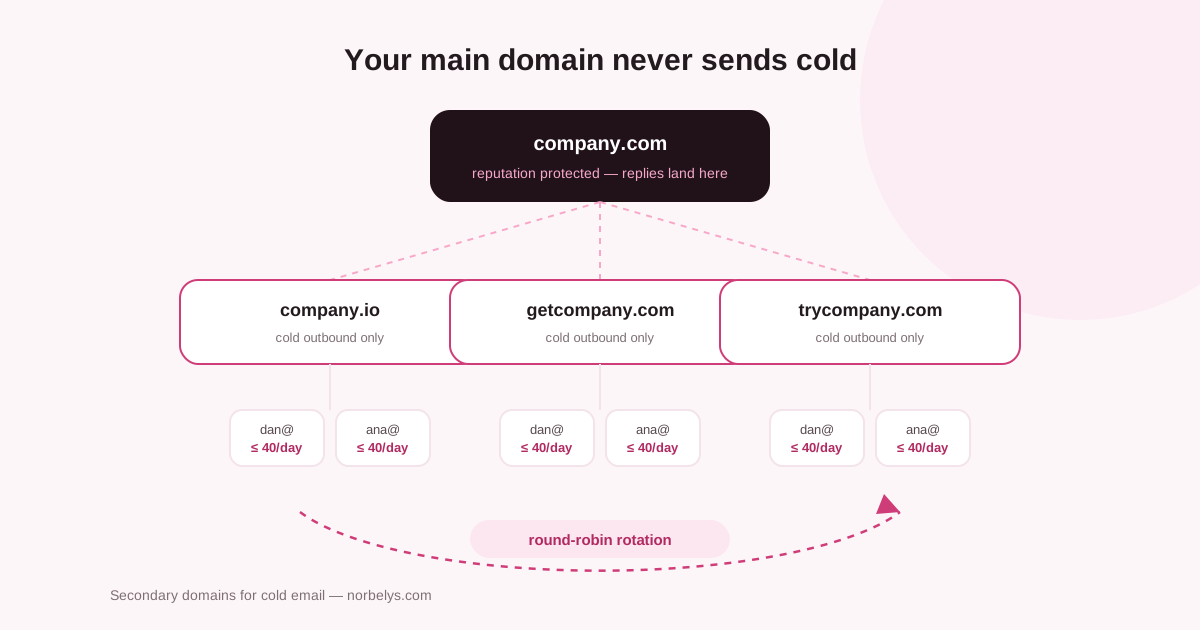
The setup, end to end
1 · Buy lookalike domains
Close variants of your real name: company.io, getcompany.com,
trycompany.com. Rules of thumb:
- Recognizable at a glance — the prospect should read it as you. Weird hyphenations and unrelated names read as phishing.
- Boring TLDs win.
.com,.co,.io. Bargain-bin TLDs arrive pre-tainted by the spammers who got there first. - One domain per ~2–3 mailboxes, ~80–120 sends/day. Need more volume? Add domains, not volume per domain. The math lives in how many cold emails per day per mailbox.
Check the age and history of anything you buy — a previously-owned domain can come with baggage. Two minutes in the WHOIS lookup and the blocklist checker before paying.
2 · Authenticate every domain like it’s your main one
Secondary doesn’t mean sloppy. Since the Gmail/Yahoo rules of 2024, mail from unauthenticated domains isn’t filtered — it’s increasingly rejected outright. Each sending domain needs:
- SPF — one lean record, under the 10-lookup budget (generator, free)
- DKIM — 2048-bit key from your sending provider (checker)
- DMARC — start at
p=nonewith reports on, and actually read them (generator, and here’s how to read the reports) - MX + a real mailbox — a domain that can’t receive mail looks disposable, and you need the replies anyway.
One pass through the domain health checker confirms all four in seconds.
3 · Redirect the naked domain
Point getcompany.com at your real website with a 301. A prospect who
types the domain into a browser should land somewhere real — a parked page
under an email asking for their time is exactly the trust-killer it looks
like. Curious prospects check.
4 · Warm up before anything sends
A fresh domain plus instant volume is a common way campaigns fail in week one. Use two weeks as the minimum observation period for one low-volume mailbox and plan four to eight weeks for a new or materially higher-volume domain. The full decision framework is in how long domain warmup takes, and the warmup calculator turns it into a day-by-day schedule. We watched what happens when you rush this on our own 11-day-old domain so you don’t have to.
Warmup on Norbelys is included, with no per-mailbox warmup charge. Some outreach platforms also include warmup; dedicated products may charge by mailbox, which compounds across a 3-domain × 3-mailbox setup.
5 · Rotate round-robin, not priority
With multiple mailboxes in a campaign, distribute sends evenly across the pool, not “fill mailbox one, overflow to two.” Round-robin keeps every mailbox comfortably under its ceiling; priority-order quietly overworks the first inbox in the list until its reputation erodes — the kind of decay nobody notices until replies are already down.
Keep per-mailbox volume under ~40/day with human-looking gaps between sends. Norbelys paces every mailbox with its own budget and jitter so a campaign can’t accidentally strip-mine one sender.
What stays on the main domain
Everything that isn’t cold: transactional mail, newsletters to opted-in lists, support, and — opinions differ, ours is firm — your warm follow-up after a meeting is booked. Once a prospect replies and the relationship is real, moving the thread to your primary domain is honest and tidy.
The failure modes to watch
- Bounce rate over 2% on a young domain does outsized damage — verify the list before it teaches Gmail who you are. On Norbelys, imports are verified automatically, no credits, included.
- Complaints over 0.3% end the domain’s useful life quickly — the complaint-rate math explains why the auto-pause thresholds exist.
- All domains behaving identically (same volume, same schedule, same copy) makes the pool look like what it is. Vary naturally.
- Forgetting the reports. DMARC on the secondaries isn’t bureaucratic — it’s your early warning that a domain is being spoofed or leaking. Ours arrive as plain-language answers, not XML.
The infrastructure isn’t glamorous, but it’s the difference between outbound as a system and outbound as a series of burned domains. Set it up once, properly, and the copy finally gets a fair test.