DMARC monitoring for agencies: one client's XML is manageable, twenty isn't
Running cold email or deliverability for many client domains means DMARC visibility across all of them at once. Why per-client XML doesn't scale.
By Norbelys Chirinos, Co-founder
Founder-reviewed ·How we research and correct articles
Running deliverability for one domain means reading DMARC reports for one domain. Running it for an agency book of business means reading them for however many client domains you’ve onboarded — five, twenty, sixty — each one producing its own daily drop of gzipped XML, from its own set of mailbox providers, at its own volume.
Nothing about DMARC itself changes at that scale. What changes is whether a manual process built for one domain survives contact with fifteen more.
The problem is arithmetic, not difficulty
Reading a single aggregate report isn’t hard. How to read DMARC reports covers the whole XML schema in one pass, and our DMARC report viewer turns any single file into a readable table in seconds. The skill isn’t the bottleneck.
The bottleneck is that DMARC reporting was designed around one domain, one mailbox, one person watching it — not around an agency structure where the same operator is responsible for a dozen unrelated domains, each with its own report volume, its own set of legitimate third-party senders, and its own drift over time. Multiply a five-minute daily check by twenty clients and it isn’t a five-minute task anymore; it’s a queue that competes with actual client work, and the thing that loses is usually the queue.
What actually breaks at N clients
A few specific things stop working cleanly once you’re past a handful of domains:
- The inbox becomes the database. Reports arrive by email, per domain, per provider, per day. Without a system, “did anything change this week” becomes an archaeology exercise through a shared inbox instead of a five-second glance at a dashboard.
- Baseline drift is invisible without a history. A single report tells you what happened yesterday. Catching a new failing source, or a previously-passing source that started failing, requires comparing against a baseline — something nobody keeps by hand across twenty domains.
- Alerting doesn’t exist. With one domain, “I’ll check it most mornings” is a real process. Across many, the only way anything surfaces reliably is if the system pushes a notification when a domain’s numbers move, rather than an operator pulling the data on a schedule they can’t actually keep.
- Client reporting turns into a screenshot deck. Even when you have found something worth telling a client, turning raw XML into a client-readable summary, domain by domain, eats the time you saved finding it in the first place.
None of these are DMARC problems. They’re operations problems that show up specifically at agency scale, and they’re the reason “just read the reports” stops being real advice somewhere between client three and client ten.
It also compounds in a direction that’s easy to underestimate: client domains aren’t static. A client swaps their CRM, adds a new transactional email tool, moves their newsletter platform, or a junior hire on their side connects something nobody told you about. Each of those events is invisible until it shows up as a new source in an aggregate report — and if nobody’s looking at that domain’s reports that week, it stays invisible until it fails loudly enough for someone to complain. At agency scale, that kind of quiet change happens somewhere in the client book more often than most people assume, simply because there are more domains generating more independent decisions you don’t control.
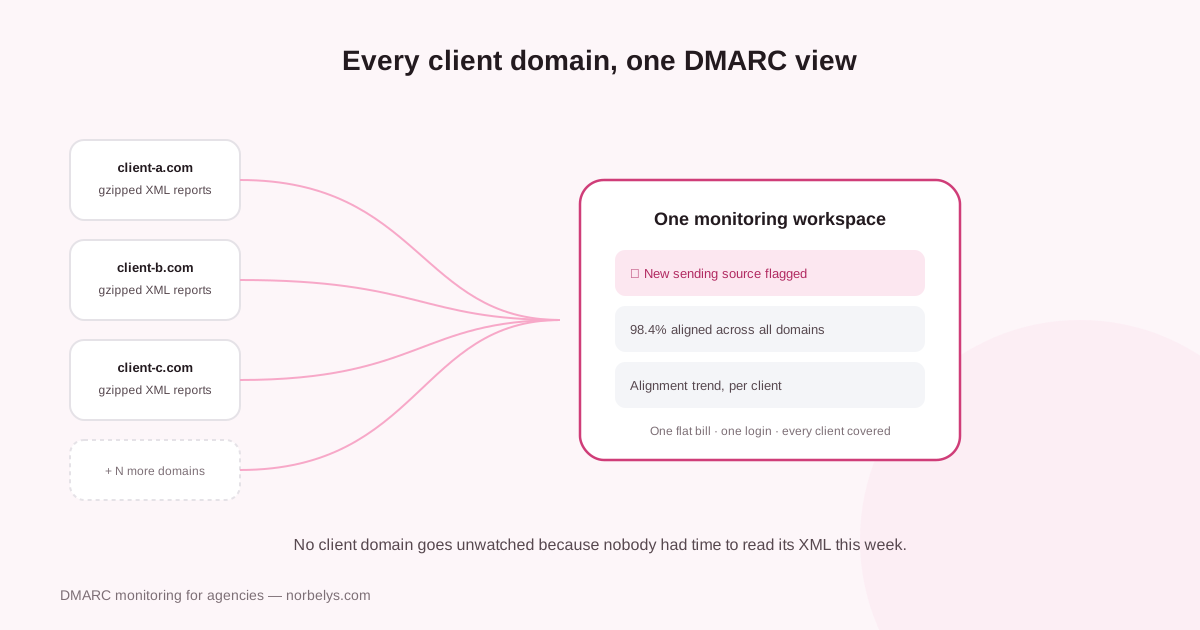
Per-client XML in, one status view out — the shift centralized monitoring makes for an agency book of domains.
Manual per-client monitoring vs. centralized
| Manual per-client DMARC monitoring | Centralized (Norbelys) | |
|---|---|---|
| Where reports land | A shared inbox or forwarding rule per client domain | One workspace per client, reports parsed automatically |
| Dashboards to check | One per client, if any exist at all | One agency view across every client workspace |
| Spotting a new failing source | Requires manually comparing today's XML to memory of last week's | Surfaced automatically against each domain's own history |
| Alerting when something changes | None — depends on someone opening the report that day | Notified when a domain's pass rate or sources shift |
| XML parsing | By hand, or one file at a time through a free tool | Handled automatically per client, no gzip/XML in the workflow |
| Time per week, at ~15 clients | Realistically hours, when it happens at all | Minutes — reviewing flagged changes, not raw reports |
| Client-facing reporting | Manually rebuilt into a deck or summary per client | Built for client-readable reporting without extra work |
| Billing model | One more line item to price and justify per client | One flat bill covers the whole client book |
Why “one workspace per client, one flat bill” is the actual answer
The core idea in Norbelys for agencies is structural, not just a feature list: each client gets an isolated workspace, so their DMARC data, their sending domains, and their reporting stay separate from every other client, while you still see everything from one place as the operator managing all of them. That’s the difference between “twenty domains, twenty sets of gzipped XML” and one place where a drifting domain actually gets noticed.
DMARC monitoring does the parsing and history-keeping continuously — every aggregate report ingested, every sending source tracked over time, drift flagged instead of buried in a daily attachment — and agency reporting turns that into something you can actually hand a client without rebuilding a deck from scratch each time someone asks “are we okay?”
None of this replaces understanding what a DMARC report means in the first place — that’s still worth learning, and how to read DMARC reports is the place to start if you haven’t. What it replaces is doing that reading, by hand, once per client, forever, on a schedule that competes with the rest of an agency’s actual work.
What to look for regardless of scale
Whether you’re running this by hand for one client or centrally for thirty, the underlying questions don’t change:
- Can you name every source sending as each client domain?
- Is each legitimate source passing DMARC, or drifting?
- Would you actually know within a week if a new source appeared, or an old one broke?
- Can you show a client what’s happening without spending an afternoon building the summary?
If the honest answer to any of those is “not reliably, once we’re past a few clients,” that’s the gap centralized monitoring is built to close — not because manual monitoring is wrong in principle, but because it stops being a process anyone can actually keep once the client count grows past what one person can hold in their head.