What a real data export looks like when you leave a cold-email platform
What a real data export should include when you leave a platform, using Norbelys's actual export bundle — plus the suspend-vs-delete distinction and grace period behind it.
By Gabriel Lara, Developer Relations, Norbelys
Founder-reviewed ·How we research and correct articles
Every SaaS product has an “export your data” button somewhere in settings. Very few of them produce something you could actually use afterward. The common failure mode is a CSV of your contact list and nothing else — no campaign structure, no send history, no record of who was suppressed and why. That’s not a data export. That’s a mailing list with the platform’s memory thrown away.
A real export has to answer a different question than “can I see my data.” It has to answer “can I rebuild, or at least fully account for, what this platform was doing on my behalf.” That’s a meaningfully higher bar, and it’s worth being concrete about what clears it — using Norbelys’s own export bundle as the working example, because “portable” is a claim that only means something once you can point at the actual file list.
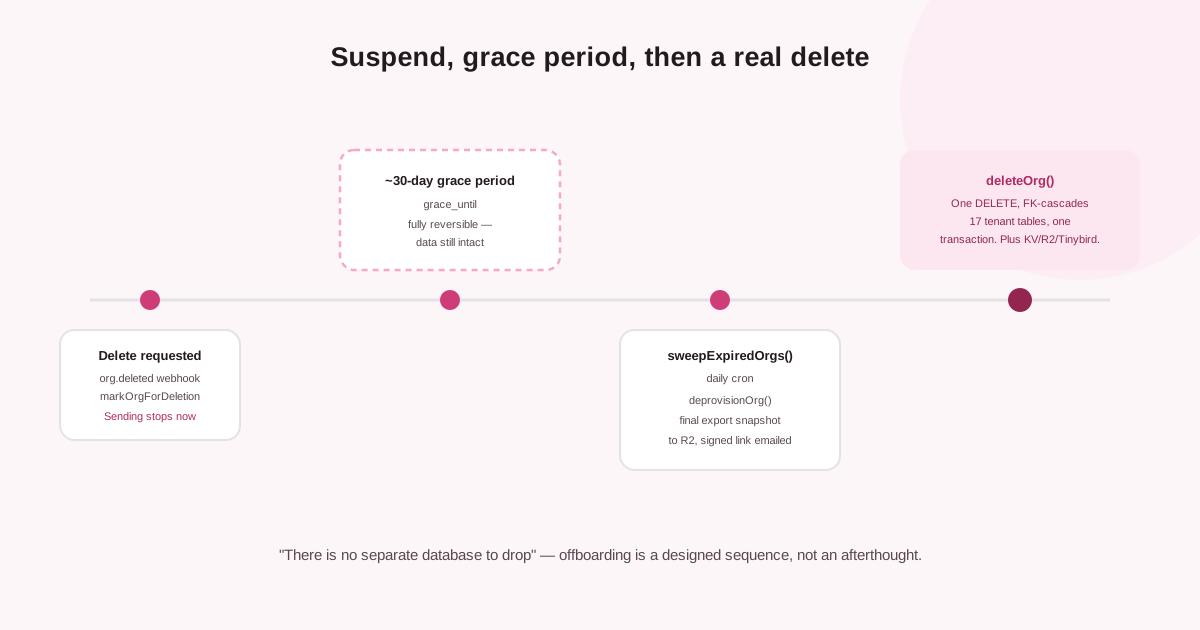
Delete isn’t instant — a reversible grace period and a final export come first.
Two very different things: suspend and delete
Before getting to the export itself, the distinction that determines when one runs matters more than people expect. “My account got cut off” and “I closed my account” sound similar from the outside. Underneath, they’re opposite operations.
| Suspend | Delete | |
|---|---|---|
| Typical trigger | Non-payment, an abuse hold | The org intentionally closes the account |
| Sending | Stops immediately — every program paused | Stops, then the org is deprovisioned |
| Data | Fully retained, resumes on reactivation | Exported, then destroyed |
| Reversible? | Yes, instantly | Yes, during a grace period — then no |
Suspension is just a status flip on the organization record. A suspended org can still log in and see its own data — sending stops immediately, but nothing is touched. That’s deliberate: the common cause of a suspension is a lapsed card, not an intentional exit, and a lapsed card should never be able to destroy a customer’s campaign history. Only an intentional account closure starts the clock toward actual deletion, and even then, not immediately.
Deletion has a grace period, on purpose
Closing an account doesn’t delete anything on the spot. The sequence is designed to make an accidental or disputed deletion recoverable, right up until it deliberately stops being recoverable:
What happens after an org closes its account
The closure is recorded, sending stops
The organization is marked for deletion and a grace period begins — on the order of 30 days. Every program pauses and every sender stops claiming work immediately. Nothing is deleted yet.
A full export is offered before anything is touched
This is the window to pull a complete copy of everything — the bundle described below — while the account is still fully intact and, if it was a mistake, still fully reversible.
The grace period runs out
If the org is never reactivated, a daily sweep picks up every organization past its grace deadline and starts the actual teardown.
A final snapshot is taken automatically
Even if nobody manually requested an export, one last export snapshot is generated and written to storage, with a signed download link emailed to the account owner — a last safety net before deletion, not an optional step someone has to remember to click.
The relational data is deleted
The organization's registry row is deleted, and because every tenant table is linked to it, that single deletion cascades to remove every one of that org's rows across the shared database in one transaction. Cache entries, stored files, and analytics events for that org are purged the same pass.
The grace period is the point where “instant and irreversible” would be the wrong design. An onboarding mistake costs you a few minutes re-entering settings. An offboarding mistake that deletes real campaign history and contact data with no recovery window is a much more expensive kind of bug to ship — so the asymmetry is intentional: instant to start using the product, deliberately not instant to stop.
What “portable” actually has to include
A portable export is one you could hand to a competent engineer with zero knowledge of the platform and have them understand what was running. That means structure, not just rows. Here’s the actual bundle:
| Bundle piece | Format | What it captures |
|---|---|---|
| Contacts | CSV | Schema.org field names (givenName, familyName, email, telephone) — the same vocabulary the API uses, not an internal shorthand |
| Programs, steps, variants | JSON | The full campaign definitions — sequencing, timing, A/B variants — not just a snapshot of the last-sent copy |
| Enrollments and activity | CSV/JSON | The actual send history: who was enrolled in what, when each step fired, what happened next |
| Inbox messages | JSON | The unibox — inbound replies and their classification |
| Suppression list | CSV | Every address or domain that was blocked from being contacted, and why |
| Events | CSV | The analytics history — opens, clicks, replies, bounces — not just a rolled-up dashboard number |
Notice what’s structural here: programs export as JSON, not CSV, because a sequence with branching steps and A/B variants doesn’t fit a flat table without losing information. A CSV of “step 1, step 2, step 3” throws away exactly the part someone would need to actually understand what the campaign did. The events file comes from the same append-only analytics history honest analytics is built from in the first place — a separate export pass from the rest of the bundle, so the export isn’t complete until both have run.
One thing that’s not in the bundle, deliberately: connected mailbox credentials. Passwords and OAuth tokens are encrypted at rest and never leave the platform in plaintext — there’s no plaintext form to export in the first place, and a data export isn’t the exception to that rule.
Why the export can’t accidentally leak another tenant’s rows
Norbelys isolates every tenant’s data at the database level, not just in application code. An export request for one organization is structurally incapable of returning another organization’s rows — the same isolation guarantee that holds for every other read in the system, not a bespoke, separately-audited code path built just for exports.
The same signed-URL pattern, incidentally, is how a lot of Norbelys’s other exportable artifacts work — DMARC aggregate reports for a monitored domain follow the same shape, though they’re domain-level deliverability history rather than tenant contact data, and aren’t part of this bundle. Worth knowing if you’re consolidating records from more than one tool during a migration: your contact and campaign export and your domain’s authentication history are two separate pulls, not one.
The export then lands as a downloadable bundle with a signed, expiring URL rather than a permanent public link — so the file exists exactly as long as you need it, not indefinitely as an unlisted-but-guessable download.
What this is actually for
Two situations, and they’re both legitimate reasons to pull this bundle, not just a closing-the-account formality:
You’re migrating platforms. A portable export means your campaign history, your suppression list, and your contact records travel with you — you’re not starting from zero on the new tool, and you’re not silently re-contacting someone who’d already opted out because the suppression list didn’t come along.
You’re closing the account for good. Even though a final snapshot happens automatically before deletion, requesting your own export earlier — during the grace period, or anytime before that — means you’re not relying on a system default as your only copy of months of send history.
Neither of these is a compliance-only feature bolted on for GDPR portability, though it satisfies that too — it’s worth contrasting with the one operation that’s the deliberate opposite of an export: GDPR right-to-erasure exists specifically to destroy PII on request, while export exists to preserve and hand back everything. Export is closer to a basic expectation: a platform that holds a record of every email you’ve sent on its infrastructure should be able to hand that record back to you, structured well enough to actually be useful, not just technically present.