Cold email templates that still work in 2026 — with the anatomy that makes them work
Eight cold email templates by scenario — trigger event, referral ask, competitor switch, follow-ups — plus the five-part anatomy behind every one of them. Under 100 words each, no fake merge-field personalization, built for the 0.3% complaint era.
By Norbelys Chirinos, Co-founder
Founder-reviewed ·How we research and correct articles
Every template post promises the same thing: copy this, get meetings. Here’s
the honest version: a template is a structure, not a script. The words
below worked because someone did twenty minutes of homework before filling
them in. Copied verbatim with {first_name} swapped, they’ll perform like
what they are — a form letter.
So this post gives you both layers: the anatomy that makes any cold email work, then eight templates built on it, each labeled with the scenario it’s for and the reason it works.
The anatomy — five parts, under 100 words
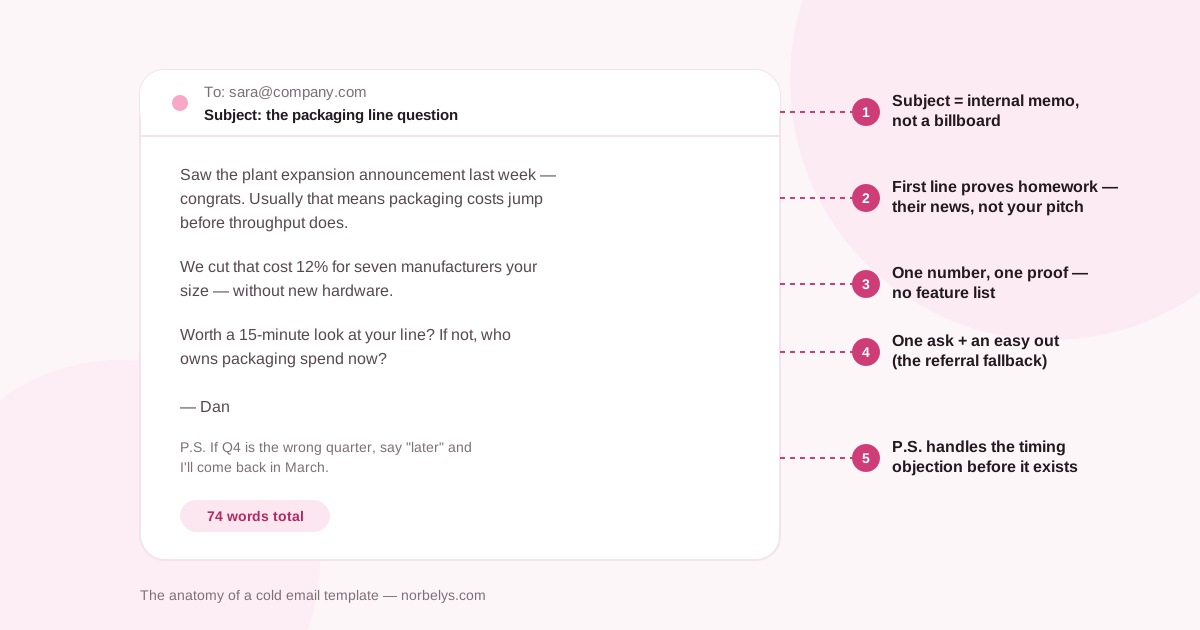
Every template in this post follows the same skeleton:
- Subject that reads like an internal memo. Two to five plain words — 36–50 characters convert best, and lowercase beats Title Case because colleagues don’t capitalize at each other. Test yours in the subject line tester.
- A first line about them. Their news, their hiring, their public numbers. Not “I hope this finds you well” — the preview pane is your second subject line and you don’t get to waste it.
- One number of proof. “We cut packaging cost 12% for seven manufacturers” beats three paragraphs of capability talk.
- One ask, with an easy out. A 15-minute call or “who owns this now?” The referral fallback converts refusals into routing.
- A P.S. that kills the timing objection. “If Q4 is wrong, say later” — because “not now” is the most common honest answer, and most emails give it nowhere to go.
Why under 100 words? Woodpecker’s June 2026 platform benchmark associates short, single-ask emails with stronger results — and Backlinko and Pitchbox’s 12-million-email study found personalized bodies were associated with roughly a third more replies. Brevity and homework aren’t style choices; they’re the two levers with data behind them.
The templates
1 · The trigger event
For when something just happened at their company — funding, expansion, a leadership change.
Subject: the austin expansion
Saw the three SDR openings in Austin — congrats. Usually that means outbound is scaling before the tooling is.
We helped two sales teams your size cut ramp time for new reps from six weeks to three by fixing exactly that.
Worth 15 minutes? If tooling isn’t your desk, who owns it?
Why it works: the trigger does the personalization for you. You’re not guessing they have the problem — the job board told you.
2 · The specific-symptom opener
For when you know the pain their role carries but have no trigger event.
Subject: the friday pipeline review
Most RevOps leads I talk to spend Friday afternoons reconciling three tools that disagree about the same pipeline.
We collapsed that to one number for teams at Series A–B — setup in an afternoon, not a quarter.
Is this a real problem for you, or did you already solve it?
Why it works: “is this real for you?” is a genuinely easy question — far easier than accepting a meeting — and the answer qualifies them either way.
3 · The referral ask
For when you’re not sure you have the right person. Deliberately shorter.
Subject: right person?
Quick one — who owns email deliverability at Acme? We’ve built a way for teams to see exactly who’s sending as their domain, and I’d rather ask than guess.
Happy to send a one-paragraph summary you can forward.
Why it works: forwarding is a five-second favor. The one-paragraph summary offer makes the favor even smaller.
4 · The competitor-switch email
For prospects visibly using an alternative you compare well against. Handle with care — respect what they chose.
Subject: your current sending setup
Noticed the tracking domain on your outreach — solid choice, and I won’t pretend otherwise.
One thing teams switching to us keep citing: their open rates were half robots, and they only found out after the migration. We count humans only, and imports take an afternoon.
If an honest side-by-side would be useful, I’ll set one up with your numbers.
Why it works: complimenting the incumbent disarms the defensiveness the email would otherwise trigger. The offer is evidence, not adjectives.
5 · Follow-up one — the nudge (day 3–4)
Subject: (same thread)
Not bumping for the sake of it — one thing I didn’t say: this takes 15 minutes to evaluate with your own data, not a demo call.
Still the wrong quarter? “Later” is a fine answer.
Why it works: a single follow-up lifts replies by ~66% (Backlinko), but only when it adds something. This adds a lower-effort path.
6 · Follow-up two — the new angle (day 8–10)
Subject: (same thread)
Different angle, then I’ll leave the thread alone: your team sent roughly 40,000 cold emails last quarter (public team size × normal volume). If even 30% of the “opens” were bot scans, every A/B decision made on them was a coin flip.
That’s the specific thing we fix. Worth a look, or should I close this out?
Why it works: it re-argues the case from evidence instead of repeating the pitch. “Should I close this out?” earns answers because it offers an ending — 42% of all replies come from follow-ups, and this is the shape of the ones that earn them.
7 · The breakup (day 15–20)
Subject: (same thread)
Closing the loop — I’ll assume the timing’s wrong and stop here.
If deliverability numbers ever start looking too good to be true, the free domain checker will still be there, no account needed.
Good sending either way.
Why it works: the breakup email consistently out-replies the middle of the sequence — loss aversion is real — and leaving a genuinely free tool behind means even a non-reply remembers you kindly.
8 · The reply to “not interested”
Not a cold email, but the template most sequences are missing.
Fair enough — and thanks for answering instead of ignoring me; most people don’t.
One question before I close you out, purely to make my targeting less annoying for the next person: was it timing, the problem not being real for you, or the way I pitched it?
Why it works: it treats a rejection as data, which flatters the reader into one more reply — and the answer genuinely improves your next hundred sends. Route it well: reply triage is where sequences earn or burn goodwill.
The rules that keep templates deliverable
A perfect template sent badly is spam with good grammar. The non-negotiables:
- Plain text, no links in email one. Links are the most-weighted spam signal on a cold send from a domain with no history.
- Under 40 sends per mailbox per day, with human gaps — the volume math doesn’t care how good your copy is.
- Verified list only. Over 2% bounces and Gmail starts rejecting you; check the list first, it’s free.
- One-click unsubscribe, honored instantly. Required above 5,000/day to Gmail since 2024, and wise at any volume — the alternative is the 0.3% complaint line.
Templates get you to a competent baseline. What moves you from competent to top-decile is the research minute per prospect — which is exactly the part Norbe automates per send, with sources cited so you can check its homework.